Updates to the Contractor payments report
A couple of improvements were made to the Contractor payments report.Improvement
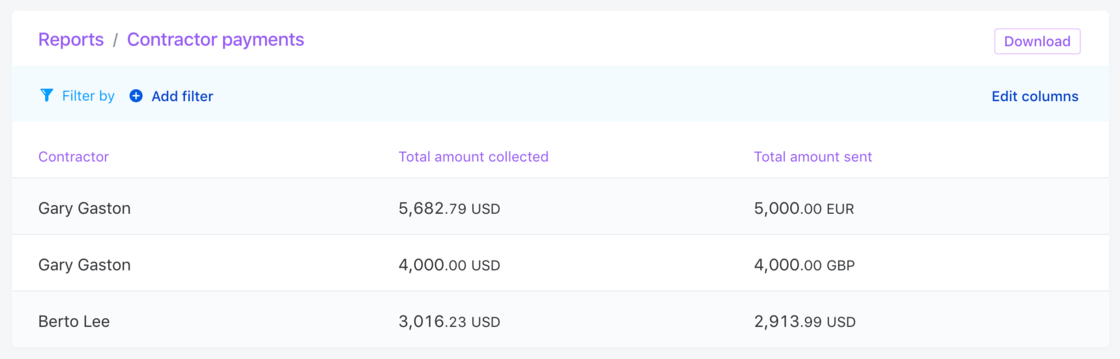
Column names were clarified
Amount collectedrefers to the amount that Pilot collected to process the payment. This amount is always in USD.Amount sentrefers to the amount that Pilot sent to the contractor.
Report downloads were improved
The CSV file format was updated to split amounts and currencies into different columns to make analysis in spreadsheets a lot easier.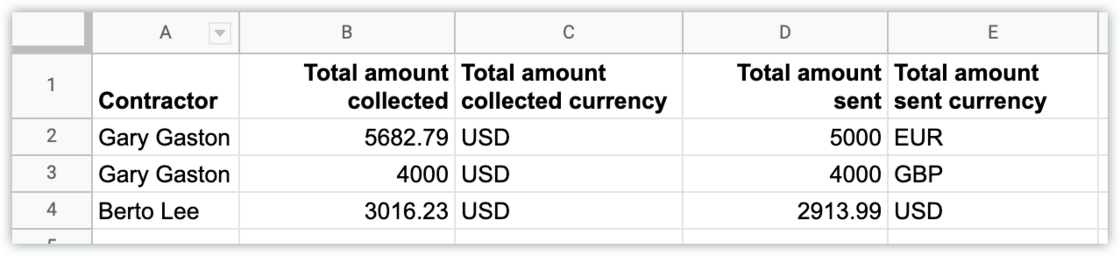
Expense report revisions
It’s now much easier to resolve rejected expense reports. When an expense report is rejected by the approver, the requestor can simply revise it and then resubmit it.Improvement
Learn more: How to review an expense reportEmail notifications for hiring and onboarding
We added additional email notifications to the employee hiring and onboarding process to help streamline the process:New
- When all three tasks under the
Approve compensation and estimated taxesmilestone are ready, admins are notified that their approval is required. - When an employee has been invited to get set up on Pilot and hasn’t done so for 24 hours, they receive an email reminder.
Updates to contractor archiving
When a contractor is archived, the account owner is still able to access their Pilot profile in a read-only and restricted state and will see that their profile is archived.Improvement
While they will be able to see historic data, such as past payment requests and expense reports, archived contractors will not be able to submit new payment requests or new expense reports, or create other new documents.Learn more: How to terminate an agreement with a contractorImproved profile switcher
The profile switcher allows users to access all of their Pilot accounts across organizations regardless of role.Improvement