

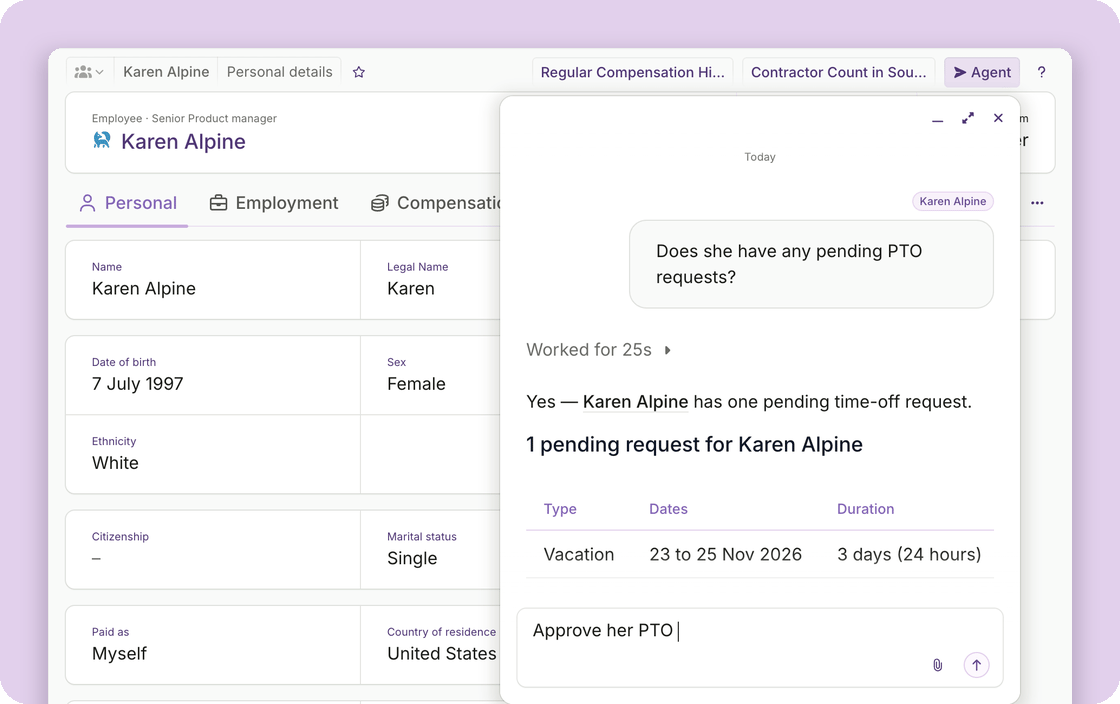
Do more with Plane Agent
An admin chooses which of these Plane Agent can do. Once allowed, ask it to:- Add team members: create the record and send the invitation.
- Record compensation: a new salary, a bonus, or another one-time earning.
- Decide on time-off requests: approve or decline, with a reason.
- Decide on expense reports: approve, reject, or mark as paid outside Plane.
- Decide on payroll items: approve, cancel approval, skip, or unskip.
- Decide on contractor payment requests: approve or decline. Approval does not pay; the payment follows as it always has.
- Create workforce plans and calculations.
- Terminate an employee or contractor: the agent first tells you what applies, such as a notice period, an active contract, or an upcoming payroll, and goes ahead once you confirm. Employer of record terminations stay with Plane.
Easier to work with
- It moves with you: the conversation stays open as you navigate around Plane. Minimize it to the toolbar and pick it up where you left off.
- It knows the record you are on: open a record, such as an employee, and that record is added as context. Ask “when was her last raise?” without naming the employee.
- Your earlier conversations are easier to find: quickly see your most recent, or search your history.
- Plane Agent knows more about itself: ask how something works or where a setting lives, and it answers from Plane’s documentation with links to the pages it used.
- Follow-ups take one click: the agent now offers the obvious next question as a button under its answer.
Other improvements
- Reports have been rebuilt: People, payroll, payments, time entries and almost every other report now share one design. Search inside a report, filter a column to a value or a date range, group by up to two columns, choose which columns you see, and download the result as CSV, Excel or PDF. Save any of it as a view, which keeps your filters, sorting, columns and grouping, and belongs to you rather than the workspace.
- Deductions for contractors: add a one-time or recurring deduction from a contractor’s Payments tab, as a fixed amount or a percentage of earnings. Plane withholds it from their next scheduled payment and shows it on their earnings statement. Available for contractors on a pay schedule.
For builders and developers
We have extended Plane’s other surfaces alongside the agent.- Offers: create one from a template or from scratch, update it, send and resend it, extend its expiry, or void it. Available through the CLI, MCP, and Plane Agent.
- Contractor payment request decisions: approve or decline a pending request, recorded against the member who asked. Available through MCP and Plane Agent.
- Payroll enrollment facts: list each team member’s payroll enrollment, whether they are eligible, and what is still outstanding. Available through MCP and Plane Agent.