

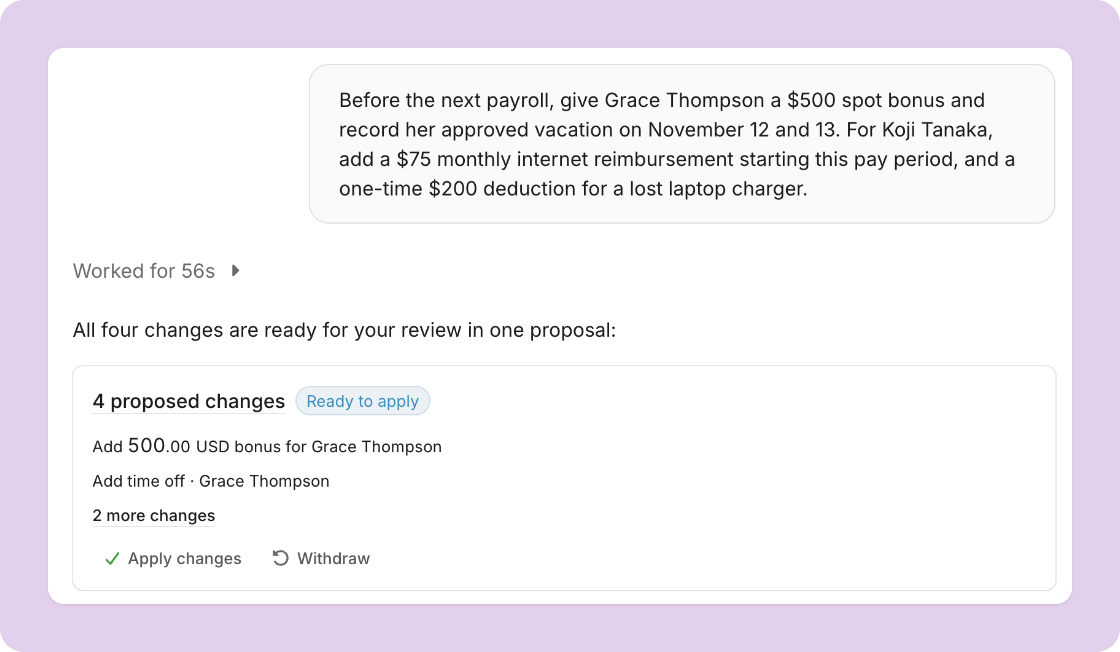
Decide what Plane Agent can change
- Set the permissions: in settings, under Workspace > Agent, choose read, request, or write for each area of Plane. By default, Plane Agent can read and request.
- Nothing changes until you apply it: with read and request alone, Plane Agent proposes each change for review before it’s applied.
- Apply related changes together: ask for several things at once, and the proposed changes arrive together, ready to review side by side and apply in one step.
- See the whole proposal: open a proposal to see every change in more detail.
Do more across Plane
Plane Agent can now take more than 80 new actions across Plane, including:- Onboard a new hire: ask Plane Agent to send an offer letter and start onboarding once it’s accepted. It keeps track of onboarding as it progresses, tells you what’s outstanding, and checks back in when a step stalls.
- Keep team member records current: update a team member’s basic and legal details, addresses, emergency contacts, title, department, manager, work location, classification, and start date, and add time off.
- Run pay: add or edit a pay schedule, create an off-cycle payroll, add deductions, benefit contributions, and recurring reimbursements, end recurring extra pay, pay a contractor’s payment request, and cancel a scheduled payment or compensation change.
- Handle contracts and documents: create a contractor’s contract from Plane’s template, edit, send, or discard a draft contract, and rename, share, or delete documents.
- Manage 1099s: change a 1099 draft, mark it not to be filed, or file a skipped one after all.
- Set up your workspace: add, edit, and remove members and their invitations, rename the workspace, add an entity, change accounting mappings, and update workspace preferences.
Other improvements
- See which conversations moved: open Agent to see your recent conversations, grouped by when each last moved. A dot marks the ones Plane Agent moved forward while you were away.
- Hear when there’s news: when Plane Agent moves a conversation forward while you’re away, Plane lets you know what changed and whether you need to act.
- Pick up an earlier conversation: Plane Agent can read your past conversations, so you can ask about something you discussed before.