

New bank account flow: Smarter and faster setup
We’ve improved the bank account experience with clearer guidance and better sequencing of country-specific fields.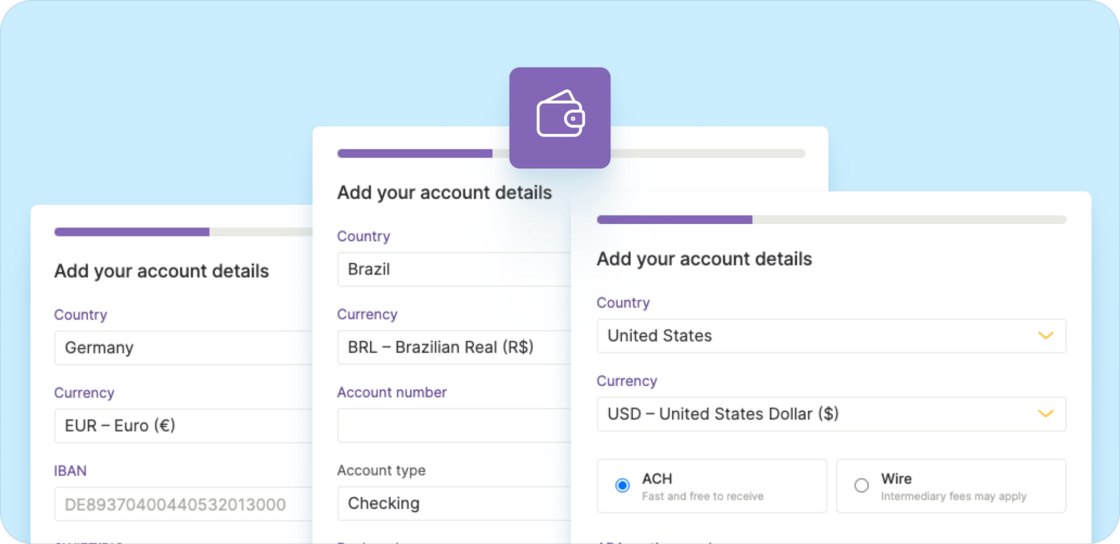
Other improvements
- New Accountant role: We added a new Accountant role for managers, designed for both internal and external accountants. This role provides access to manage accounting automation and run all reports.
- Payroll totals in groups: When you work with payroll groups in Run > Payroll, you’ll now see a total amount in the header for quick reference.
View benefits for US employees in one convenient place
We added a new Benefits tab to the profile of US employees to make it easier to audit and track benefits and understand how they are handled in payroll.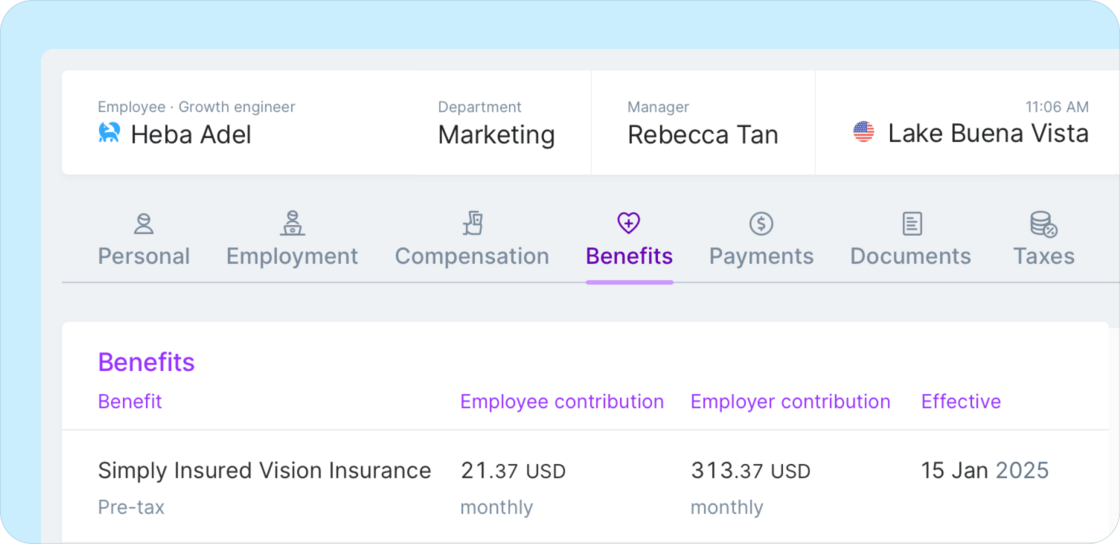
- View benefits at a glance: All active benefits are shown in the Benefits tab with details including effective dates, tax treatment, and employee and employer contributions.
- View benefits history: All active and historical benefits are displayed in a timeline view.
Other improvements and fixes
- Other earnings restricted to second pay period for certain countries: Bonuses and commissions can now only be requested in the second pay period of a month for international employees in countries with restricted payout schedules, like Mexico.
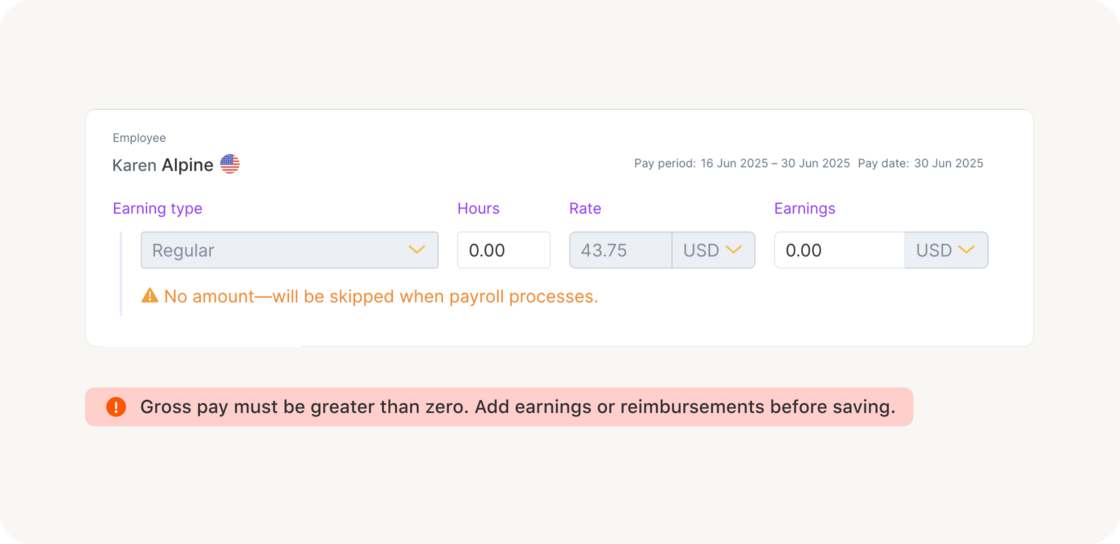
- Usability improvements when editing payroll: When editing payroll items, warning messages for zero-amount “other earnings” are now delayed until you try to save. We also do a better job clearing errors as you make corrections.
- Visual fixes related to style upgrades: As part of an ongoing project to upgrade styles behind the scenes, we inadvertently introduced a few visual glitches—such as buttons not appearing correctly as buttons. We’ve corrected these issues.
A small layout upgrade and behind-the-scenes improvements
We’ve made a series of improvements across the platform — some you’ll notice right away, like the updated team profile tabs, and others that quietly improve accuracy behind the scenes. Here’s what’s new: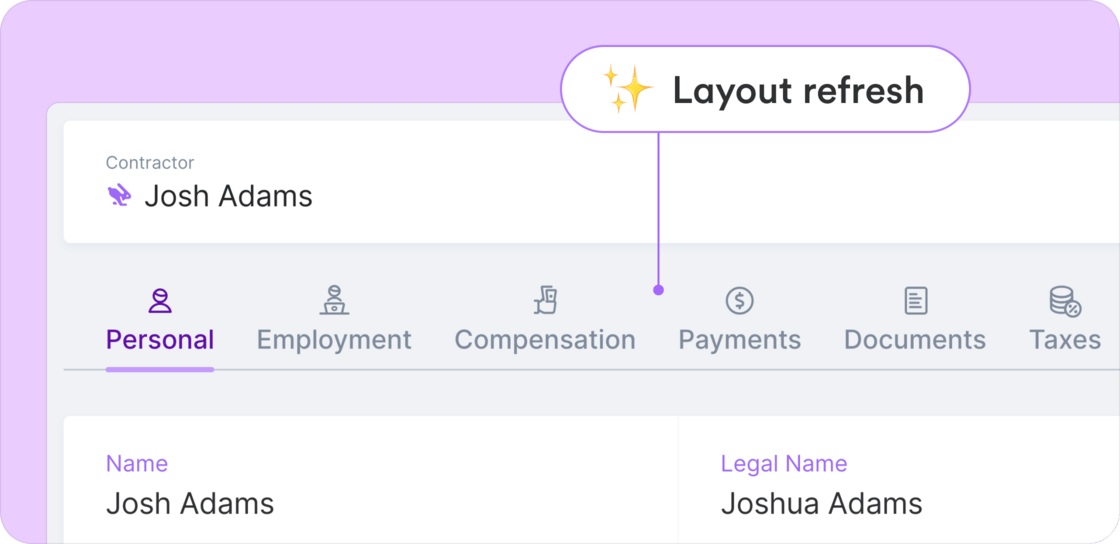
- Layout refresh for team profiles: We’ve updated the tab layout on team member profiles to make more space for upcoming features arriving soon.
-
Smoother handling of recurring reimbursements: We fixed an issue that could cause recurring reimbursements to be duplicated when editing payroll to override amounts.
- To update or stop recurring reimbursements, make changes directly in the team member’s profile — not by editing a payroll item directly
- You can still add one-time reimbursements directly in payroll, but recurring ones can’t be edited or removed there
-
Fixes to accounting automation: We resolved multiple bugs affecting how Plane syncs and updates accounting data:
- Fixed a bug where users were blocked from marking accounting items as “prepared”
- Fixed an issue where account mappings in QuickBooks Online didn’t load correctly, preventing users from selecting accounts or seeing account names
- More accurate payroll timing for EOR expenses: We fixed an issue that, in certain edge cases, caused some expenses in EOR payroll to be assigned to a past pay period — resulting in them being skipped during processing.
- Onboarding status fix in the People report: Onboarding status is now shown correctly.
-
Expanded list of time-off types: We added several new time-off types to support broader use cases.
- New types include: Marriage leave, Working time reduction (RTT), Family / Compassionate leave, and Dependent sick leave
- These types are not enabled by default; organization admins can choose to enable them as needed in Time-off settings.
More flexibility for non-standard payroll scenarios
We’ve expanded support and improved usability for payroll runs that don’t follow the typical pattern.- Run bonus-only, reimbursement-only, and other non-standard pay setups without regular earnings
-
Clearer inline warnings and errors explain what will be skipped in payroll and what needs to be fixed
Other improvements and fixes
- Missing 401(k) year-to-date values on earnings statements fixed: Year-to-date contributions now appear correctly on earnings statements for all employees.
- Some approved expenses not included in payroll fixed: Approved reimbursements now correctly attach to payroll.
- Cancelled recurring reimbursements fixed: Resolved an issue for specific cases where discontinued reimbursements reappeared in payroll.
- Run payroll loads much faster: We significantly improved load times for the Run payroll page, especially for larger payrolls.
Greater clarity around payroll blockers and issues
We’ve made it much easier to spot and resolve what’s blocking payroll — especially when it’s a company-wide issue that needs immediate attention.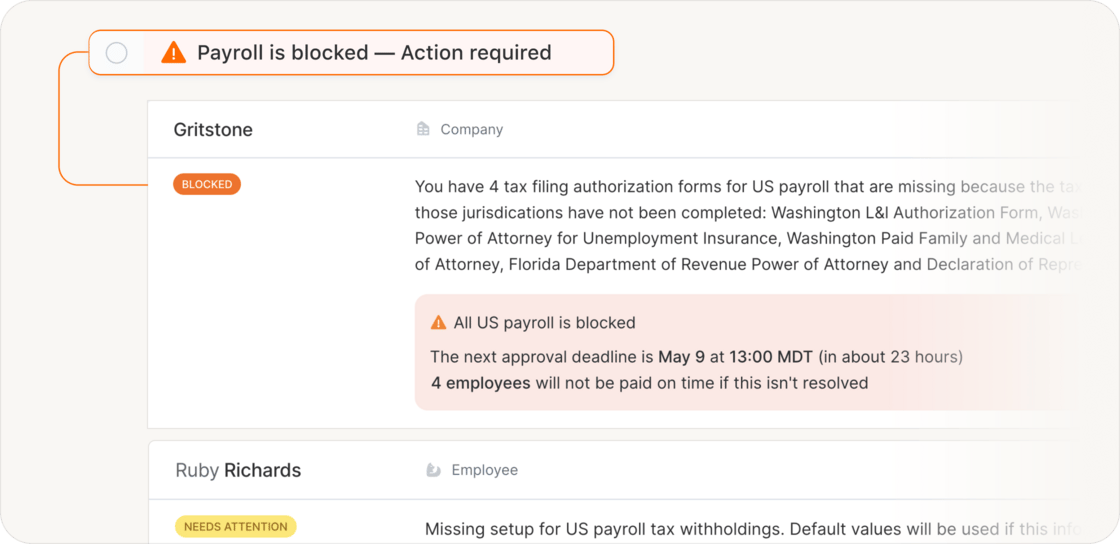
- A critical task is now pinned to the top of your dashboard when payroll is blocked; it disappears once resolved, and you’ll get an in-app notification
- We’ve redesigned the Payroll > Issues page to help you understand what’s blocking payroll, what needs attention, and what to do next
- Company-level blocking issues now appear with greater urgency, showing a
Resolve ASAPlabel, deadline, and the number of employees affected - Non-blocking issues include clear guidance about risks like late filings or penalties
- The Issues page is now linked directly from Payroll in the sidebar menu
- Company-level blocking issues now appear with greater urgency, showing a
- Status updates refresh much more quickly — in near real-time so you’re always up to date
Other improvements and fixes
- Time-off tab error resolved: Fixed a permissions issue that prevented the Upcoming Time-off tab from loading
- No more duplicate contractors in off-cycle payroll: Contractors now appear only once when you’re selecting payees in off-cycle payment flows
- Date fixed when discontinuing payroll: The “Discontinue after” date selector no longer allows selections outside of valid payroll periods
- Year-to-date values restored in earnings statements: YTD totals for deductions and employer contributions now display correctly
- Improved pay schedule assignment for US employees: Validation messages are now clearer when start dates fall before, during, or after a pay period, and only open pay periods are shown for selection
Improvements and fixes
We released an update to pay schedule assignments and a few fixes.- Pay schedule assignments: When someone is removed from payroll, we clearly show when their payroll ended on their profile’s compensation tab
- Payroll summary report: Department-level breakdowns are now correctly included again for international employees
- Contractor onboarding: Fixed an issue affecting contractors created via Plane’s API, where contracts were incorrectly expected to be signed after the contractor was invited
- Payroll details: Resolved a display issue where some payroll components weren’t showing in the Payments section of a team member’s profile
All customers get compensation updates — plus key fixes
This update brings improvements to compensation and reporting, plus a round of fixes.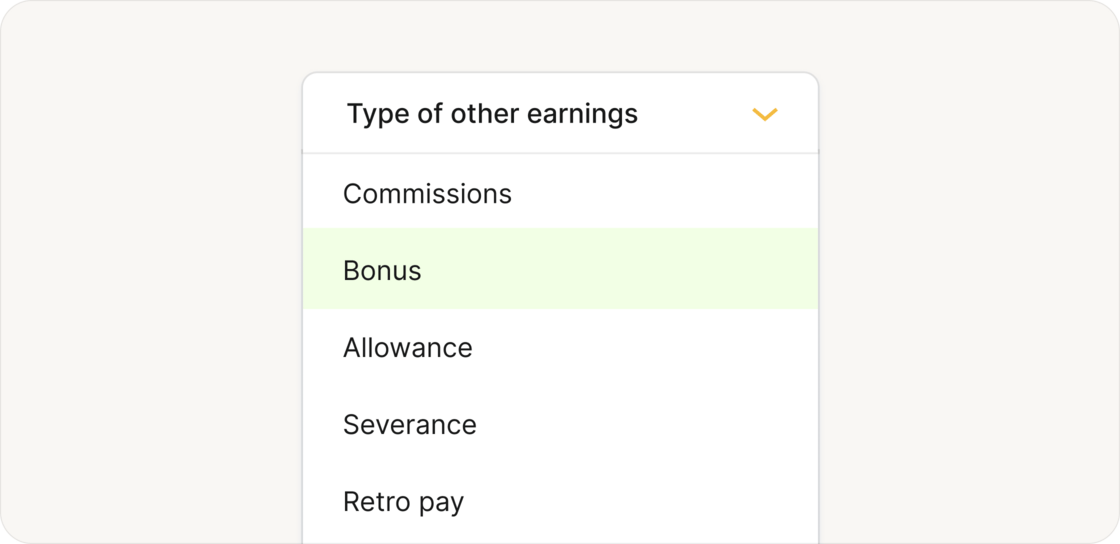
Improvements
- Update on compensation changes: All customers can now manage bonuses, allowances, and other earnings from a team member’s profile. We also made a few updates to improve clarity and usability. Learn more
- People report improvements: The report now reflects the separate status tracking we introduced earlier—showing individual fields for employment status, onboarding, and offboarding. Previously, these were merged into a single status, making it harder to tell where someone was in their journey.
- Error page navigation: We added a “Go back” button to the general error page. Previously, users often clicked “Sign out” after encountering an error, not realizing they could simply use the browser’s back button.
Fixes
- Expense report exports: Users can export expense reports to CSV and Excel without errors
- Payroll detail view: From a team member’s profile, drilling into a payroll payment now shows the correct payroll item view for international employees, instead of incorrectly linking to the earnings statement PDF
- Form I-9 message: US employees no longer see the message “This request is already closed” after submitting Form I-9
Easily log time with time tracking
Team members can now log time in Plane in a new Time tracking section. To submit a time entry, simply select a date, enter the number of hours worked, and add an optional note.Team members can now log time in Plane in a new Time tracking section. To submit a time entry, simply select a date, enter the number of hours worked, and add an optional note. Admins can also enter time on behalf of employees and contractors, providing flexibility in managing work hours. This feature currently isn’t integrated with payroll and is primarily meant to be used for compliance (e.g., to document overtime eligibility for EOR employees).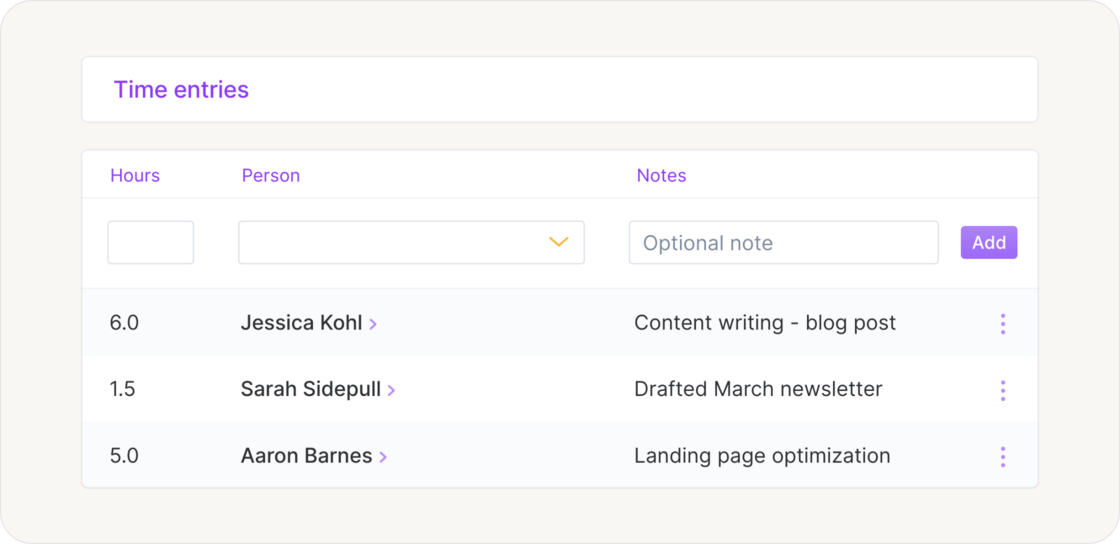
Other improvements and fixes
- Improved setup for recurring earnings: Admins now select a last pay period instead of a specific date to end recurring other earnings. They can choose to continue indefinitely or set a final pay period within the next two years, making it clearer when the final payment will be made.
- Balance page performance: We’ve improved loading speed and responsiveness for a smoother experience.
- Time-off request notifications: When a manager is assigned to a team member, only the manager will receive time-off request notifications. Admins will only be notified if no manager is assigned.
- Fix for payment method error: Team members no longer see an error message after successfully adding a payment method. The process now completes as expected.