> ## Documentation Index
> Fetch the complete documentation index at: https://docs.plane.com/llms.txt
> Use this file to discover all available pages before exploring further.
# Changelog
> New features, improvements, and fixes in Plane
## [Easily log time with time tracking](/changelog/2025-03-13-easily-log-time-with-time-tracking)
Team members can now log time in Plane in a new Time tracking section. To submit a time entry, simply select a date, enter the number of hours worked, and add an optional note.
Team members can now log time in Plane in a new [Time tracking](https://manage.plane.com/time-entries) section. To submit a time entry, simply select a date, enter the number of hours worked, and add an optional note. Admins can also enter time on behalf of employees and contractors, providing flexibility in managing work hours. This feature currently isn't integrated with payroll and is primarily meant to be used for compliance (e.g., to document overtime eligibility for EOR employees).
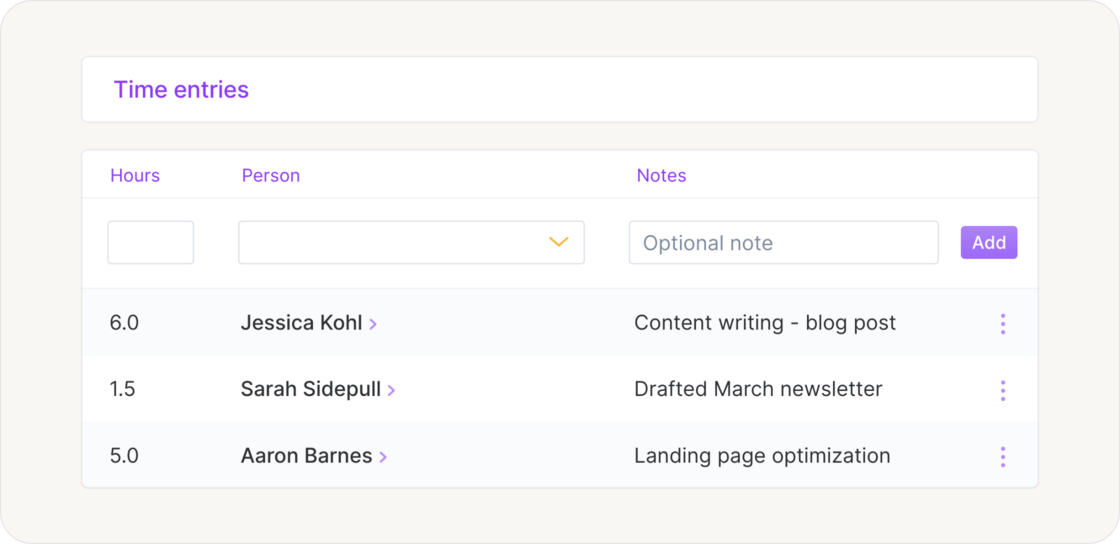 All new customers have access by default, and we’ve enabled it for many existing customers with a specific need. If you don’t see time tracking in your account and would like to use it, reach out to [Plane Support](https://mailto:support@plane.com), and we’ll get you set up.
## Other improvements and fixes
* **Improved setup for recurring earnings**: Admins now select a *last pay period* instead of a specific date to end recurring other earnings. They can choose to *continue indefinitely* or set a final pay period within the next two years, making it clearer when the final payment will be made.
* **Balance page performance**: We’ve improved loading speed and responsiveness for a smoother experience.
* **Time-off request notifications:** When a manager is assigned to a team member, only the manager will receive time-off request notifications. Admins will only be notified if no manager is assigned.
* **Fix for payment method error**: Team members no longer see an error message after successfully adding a payment method. The process now completes as expected.
## [Ethnicity tracking for reporting and compliance](/changelog/2025-02-25-ethnicity-tracking-for-reporting-and-compliance)
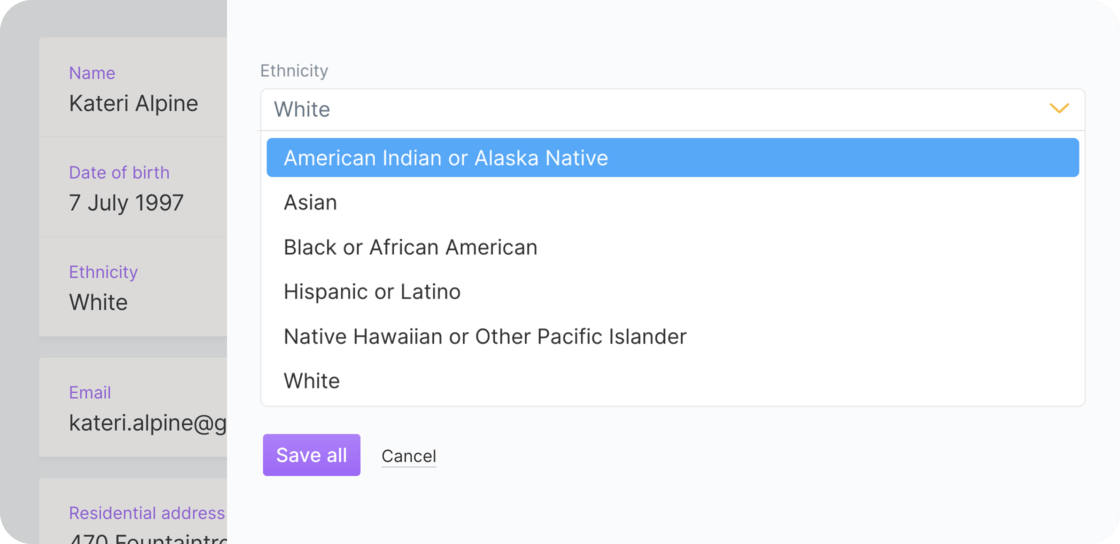
Admins, managers, and team members can now record ethnicity information in worker profiles, helping organizations improve diversity reporting and meet compliance requirements. Ethnicity information is optional.
All new customers have access by default, and we’ve enabled it for many existing customers with a specific need. If you don’t see time tracking in your account and would like to use it, reach out to [Plane Support](https://mailto:support@plane.com), and we’ll get you set up.
## Other improvements and fixes
* **Improved setup for recurring earnings**: Admins now select a *last pay period* instead of a specific date to end recurring other earnings. They can choose to *continue indefinitely* or set a final pay period within the next two years, making it clearer when the final payment will be made.
* **Balance page performance**: We’ve improved loading speed and responsiveness for a smoother experience.
* **Time-off request notifications:** When a manager is assigned to a team member, only the manager will receive time-off request notifications. Admins will only be notified if no manager is assigned.
* **Fix for payment method error**: Team members no longer see an error message after successfully adding a payment method. The process now completes as expected.
## [Ethnicity tracking for reporting and compliance](/changelog/2025-02-25-ethnicity-tracking-for-reporting-and-compliance)
Admins, managers, and team members can now record ethnicity information in worker profiles, helping organizations improve diversity reporting and meet compliance requirements. Ethnicity information is optional.
 ## Other improvements and fixes
* **Off-cycle payroll availability**: Admins can now initiate off-cycle payroll even when no workers are assigned to a regular pay schedule. If there’s no regular payroll to process, a link to off-cycle payroll will be shown.
* **Fix for department changes**: Admins and managers can update a team member’s `Department` in their profile without also having to add a name to the `Manager` field. Additionally, saving changes no longer redirects you away from the profile unexpectedly.
## [Clearer and more flexible compensation management](/changelog/2025-02-15-clearer-and-more-flexible-compensation-management)
This update brings improvements to compensation and earnings management:
## Other improvements and fixes
* **Off-cycle payroll availability**: Admins can now initiate off-cycle payroll even when no workers are assigned to a regular pay schedule. If there’s no regular payroll to process, a link to off-cycle payroll will be shown.
* **Fix for department changes**: Admins and managers can update a team member’s `Department` in their profile without also having to add a name to the `Manager` field. Additionally, saving changes no longer redirects you away from the profile unexpectedly.
## [Clearer and more flexible compensation management](/changelog/2025-02-15-clearer-and-more-flexible-compensation-management)
This update brings improvements to compensation and earnings management:
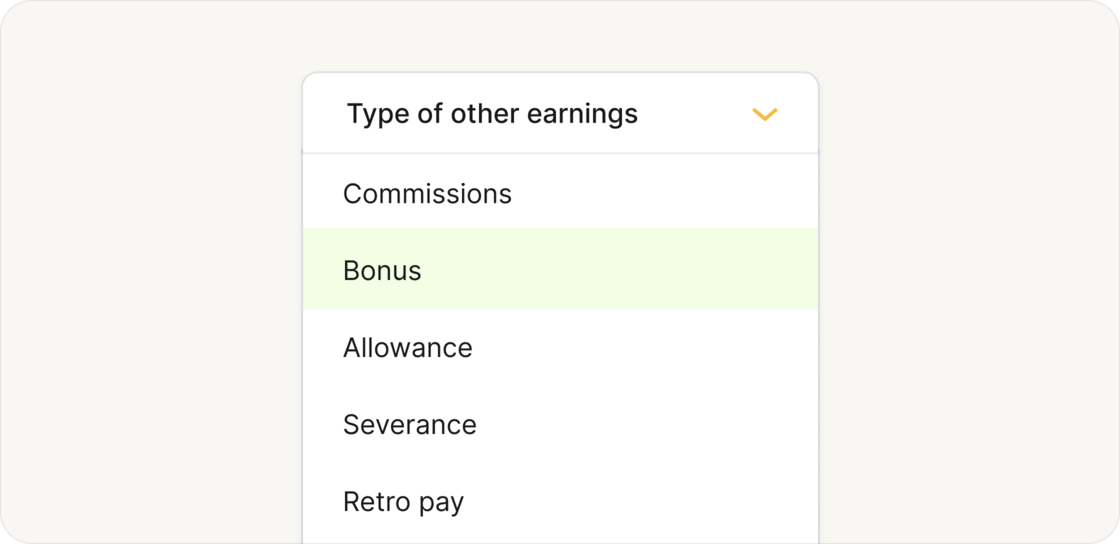 **More Flexible Earnings Management:** Admins can now add more types of earnings directly through a team member's profile, ensuring consistency with direct payroll changes. We also retired the “Other” earnings type, as it’s now covered by “Allowance”. Additionally, we made layout tweaks to make pay frequency more apparent for recurring earnings.
Note: Simplified management for other earnings is being rolled out in phases.
**Clearer Overtime Requests**: For international employees, the amount field no longer shows 0.0 while the calculation is pending. Instead, it displays “To be calculated” alongside the requested hours and updates automatically once available.
**Compensation History Improvements**: We made significant updates to team members’ compensation history, including removing duplicates, to ensure accuracy and consistency.
## [Smarter accounting category mappings](/changelog/2025-01-27-smarter-accounting-category-mappings)
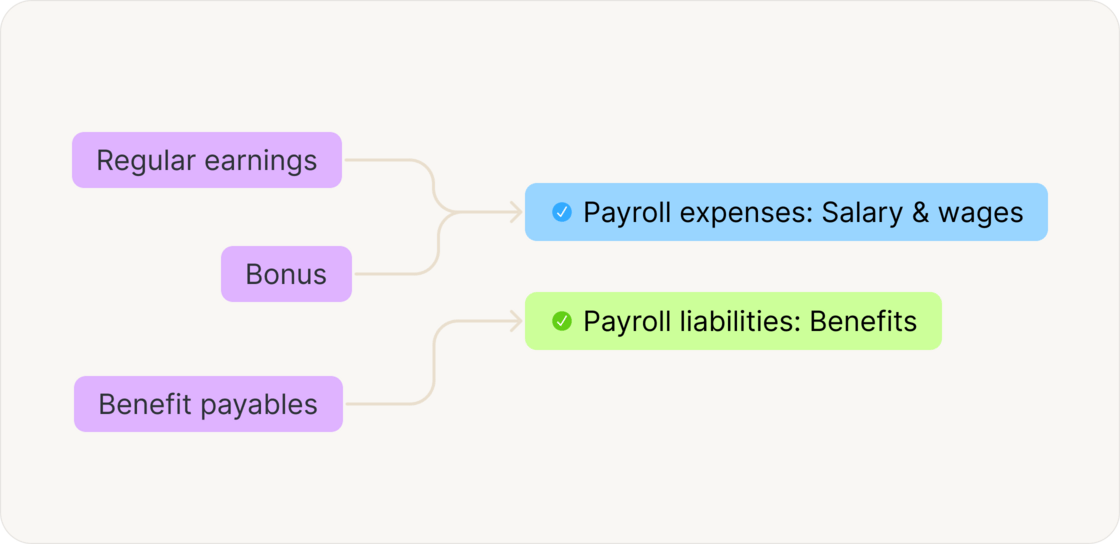
We added more business rules to improve accuracy when mapping Plane accounting categories to QuickBooks Online (QBO) accounts.
**More Flexible Earnings Management:** Admins can now add more types of earnings directly through a team member's profile, ensuring consistency with direct payroll changes. We also retired the “Other” earnings type, as it’s now covered by “Allowance”. Additionally, we made layout tweaks to make pay frequency more apparent for recurring earnings.
Note: Simplified management for other earnings is being rolled out in phases.
**Clearer Overtime Requests**: For international employees, the amount field no longer shows 0.0 while the calculation is pending. Instead, it displays “To be calculated” alongside the requested hours and updates automatically once available.
**Compensation History Improvements**: We made significant updates to team members’ compensation history, including removing duplicates, to ensure accuracy and consistency.
## [Smarter accounting category mappings](/changelog/2025-01-27-smarter-accounting-category-mappings)
We added more business rules to improve accuracy when mapping Plane accounting categories to QuickBooks Online (QBO) accounts.
 We also made other improvements and fixes in accounting automation:
**Journal entry numbers displayed:** Journal entry numbers are now visible in the preview view, making it easier to review entries directly in Plane and compare them with those exported to your accounting system.
**QuickBooks Online reconnections now smoother:** When you disconnect and reconnect your QBO account, your accounting automation configurations are now preserved. We also fixed an issue that caused duplicate account names to appear.
**Batch operations fixed:** Batch actions, like selecting all accounting items and marking them as prepared, now work reliably and without issues.
## Other improvements
**More intuitive off-cycle payroll:** All items for an off-cycle payroll are now grouped together with the same approval deadline. Previously, local holidays could extend processing times, causing items to have different deadlines and show up in multiple off-cycle groups. With this change, everything stays in one group, making it easier to review and approve.
**Search term carries over to onboarding:** When you search for a team member on the Team page, you might spot someone who’s currently onboarding. There’s a handy link at the bottom of the page to jump to the Onboarding page. Previously, your search term didn’t carry over, but now it does — making it easier to find exactly who you’re looking for.
## [Quickly understand team member statuses with improved UI indicators](/changelog/2025-01-16-quickly-understand-team-member-statuses-with-improved-ui-indicators)
We’ve enhanced the way employment, onboarding, and offboarding statuses are displayed for team members to make the interface clearer and more intuitive.
We also made other improvements and fixes in accounting automation:
**Journal entry numbers displayed:** Journal entry numbers are now visible in the preview view, making it easier to review entries directly in Plane and compare them with those exported to your accounting system.
**QuickBooks Online reconnections now smoother:** When you disconnect and reconnect your QBO account, your accounting automation configurations are now preserved. We also fixed an issue that caused duplicate account names to appear.
**Batch operations fixed:** Batch actions, like selecting all accounting items and marking them as prepared, now work reliably and without issues.
## Other improvements
**More intuitive off-cycle payroll:** All items for an off-cycle payroll are now grouped together with the same approval deadline. Previously, local holidays could extend processing times, causing items to have different deadlines and show up in multiple off-cycle groups. With this change, everything stays in one group, making it easier to review and approve.
**Search term carries over to onboarding:** When you search for a team member on the Team page, you might spot someone who’s currently onboarding. There’s a handy link at the bottom of the page to jump to the Onboarding page. Previously, your search term didn’t carry over, but now it does — making it easier to find exactly who you’re looking for.
## [Quickly understand team member statuses with improved UI indicators](/changelog/2025-01-16-quickly-understand-team-member-statuses-with-improved-ui-indicators)
We’ve enhanced the way employment, onboarding, and offboarding statuses are displayed for team members to make the interface clearer and more intuitive.
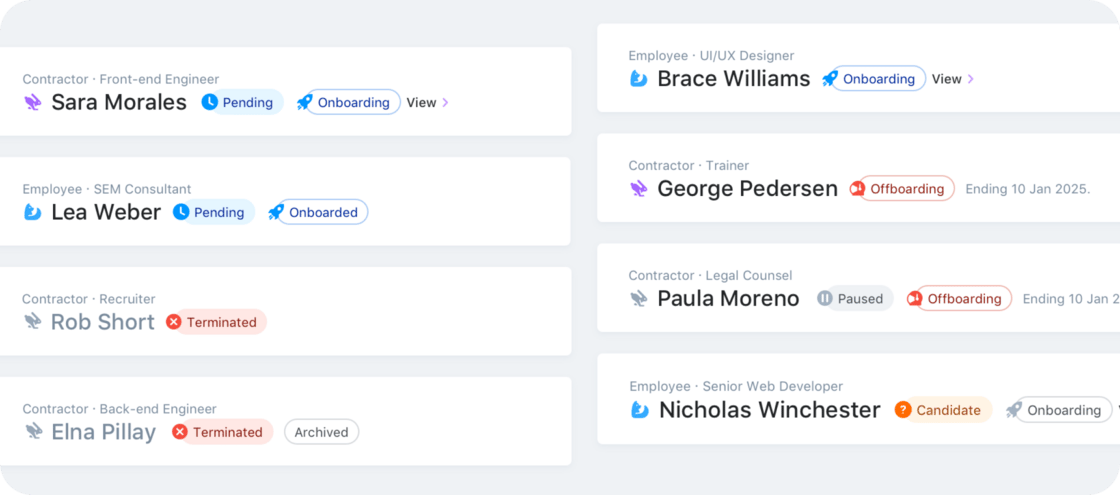 The following employment statuses are now shown at the top of a person's profile:
* `Candidate`: The offer hasn't been accepted yet (when applicable)
* `Pending`: The start date is in the future
* `Cancelled`: Employment was canceled before the start date
* `Paused`: The team member is on a leave of absence
* `Terminated`: Employment has ended
No status is displayed for Active team members to keep the interface clean and focused. In addition, onboarding and offboarding statuses are displayed to provide more context about a team member’s current status.
## Other improvements and fixes
* The filter on the [Team](https://manage.plane.com/people) page now defaults to `Active`, `Pending`, and `Candidate` statuses (previously just `Active`) to provide immediate visibility into team members who will be joining soon
* We resolved an issue where the primary work location for US employees wasn’t properly syncing with their home address
## [Greater flexibility with role-based permissions for managers](/changelog/2024-12-20-greater-flexibility-with-role-based-permissions-for-managers)
We’ve introduced role-based Permissions to provide greater control and flexibility when managing your team. Now, you can assign managers one of the following roles:
We’ve introduced **role-based Permissions** to provide greater control and flexibility when managing your team. Now, you can assign managers one of the following roles:
The following employment statuses are now shown at the top of a person's profile:
* `Candidate`: The offer hasn't been accepted yet (when applicable)
* `Pending`: The start date is in the future
* `Cancelled`: Employment was canceled before the start date
* `Paused`: The team member is on a leave of absence
* `Terminated`: Employment has ended
No status is displayed for Active team members to keep the interface clean and focused. In addition, onboarding and offboarding statuses are displayed to provide more context about a team member’s current status.
## Other improvements and fixes
* The filter on the [Team](https://manage.plane.com/people) page now defaults to `Active`, `Pending`, and `Candidate` statuses (previously just `Active`) to provide immediate visibility into team members who will be joining soon
* We resolved an issue where the primary work location for US employees wasn’t properly syncing with their home address
## [Greater flexibility with role-based permissions for managers](/changelog/2024-12-20-greater-flexibility-with-role-based-permissions-for-managers)
We’ve introduced role-based Permissions to provide greater control and flexibility when managing your team. Now, you can assign managers one of the following roles:
We’ve introduced **role-based Permissions** to provide greater control and flexibility when managing your team. Now, you can assign managers one of the following roles:
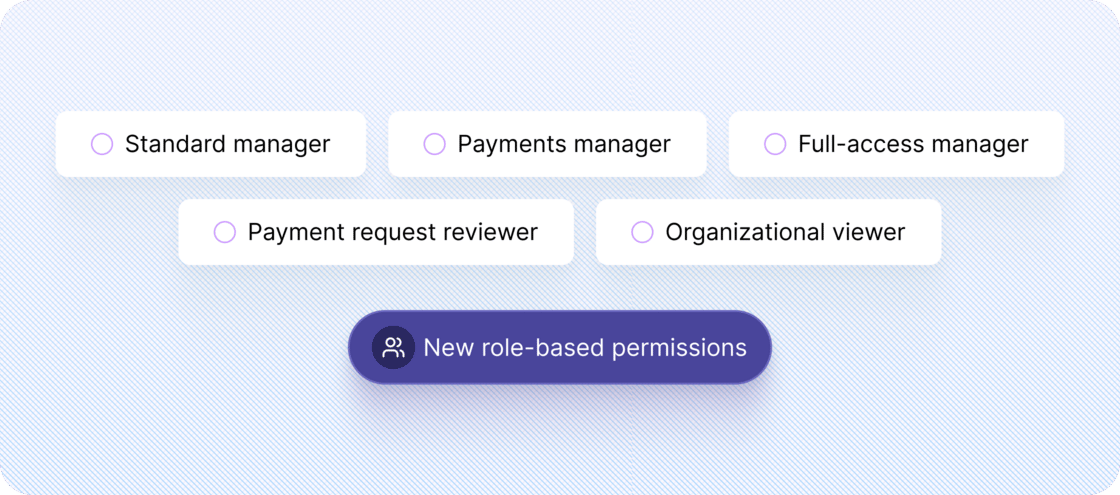 **Standard manager**: Complete onboarding tasks and manage profiles of direct reports. Approve expenses, time-off, and payment requests
**Payments manager**: Includes all Standard manager permissions plus the ability to view and authorize one-time payments
**Full-access manager**: Includes all Payments manager permissions plus the ability to add and offboard direct reports
**Payment request reviewer**: Approve contractor payment requests under a specified manager or department
**Organizational viewer**: Read-only access to all organizational data and settings
With this update, you’ll have clearer control over access levels and responsibilities across your organization. 🎉 See our [help article](https://help.plane.com/en/articles/4640258).
## Other improvements and fixes
* The Team page now displays a person's preferred first name (if specified) instead of their legal first name. Search will match on either
* Team members who have completed onboarding but are awaiting their start date now have full access to the appropriate Plane features.
* Payments canceled before their associated charges are processed no longer appear in accounting items or journal entries
## [Find team members using quick filters](/changelog/2024-12-12-find-team-members-using-quick-filters)
You can now filter team members by employment type (contractor or employee) and employment status on the Team page.
**Standard manager**: Complete onboarding tasks and manage profiles of direct reports. Approve expenses, time-off, and payment requests
**Payments manager**: Includes all Standard manager permissions plus the ability to view and authorize one-time payments
**Full-access manager**: Includes all Payments manager permissions plus the ability to add and offboard direct reports
**Payment request reviewer**: Approve contractor payment requests under a specified manager or department
**Organizational viewer**: Read-only access to all organizational data and settings
With this update, you’ll have clearer control over access levels and responsibilities across your organization. 🎉 See our [help article](https://help.plane.com/en/articles/4640258).
## Other improvements and fixes
* The Team page now displays a person's preferred first name (if specified) instead of their legal first name. Search will match on either
* Team members who have completed onboarding but are awaiting their start date now have full access to the appropriate Plane features.
* Payments canceled before their associated charges are processed no longer appear in accounting items or journal entries
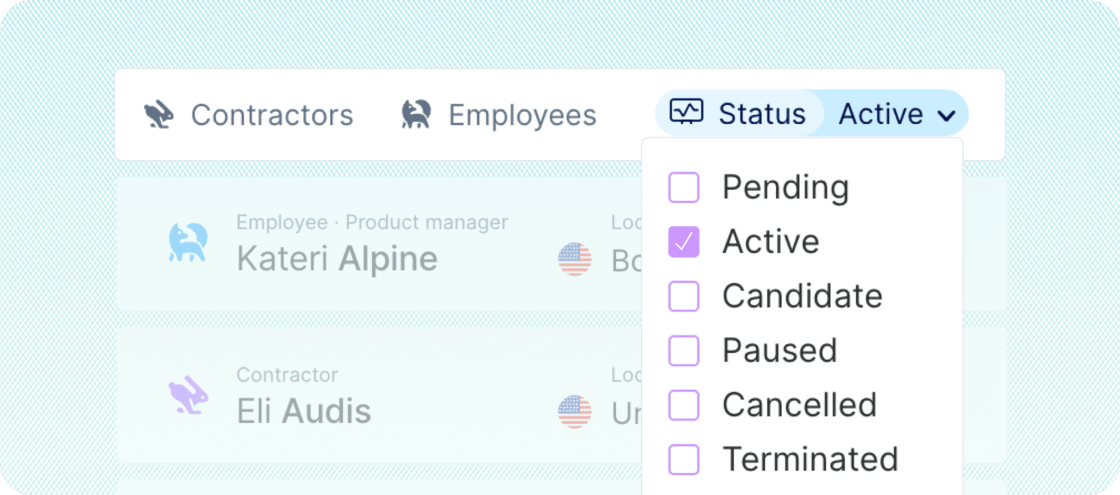
## [Find team members using quick filters](/changelog/2024-12-12-find-team-members-using-quick-filters)
You can now filter team members by employment type (contractor or employee) and employment status on the Team page.
 ## Other improvements and fixes
* Resolved an intermittent issue that prevented document uploads during company onboarding
* The job title filter on the [People](https://manage.plane.com/reports/people) report now works as expected
* We addressed an issue that allowed contractors and U.S. employees to be assigned to pay schedules meant exclusively for international employees
* We fixed an issue that allowed “Other” compensation types for payroll, ensuring unsupported types cannot be assigned to people on payroll
## [Simplified management for bonuses, commissions, and allowances](/changelog/2024-11-21-simplified-management-for-bonuses-commissions-and-allowances)
We’ve made it easier to manage bonuses, commissions, and allowances for team members on payroll.
## Other improvements and fixes
* Resolved an intermittent issue that prevented document uploads during company onboarding
* The job title filter on the [People](https://manage.plane.com/reports/people) report now works as expected
* We addressed an issue that allowed contractors and U.S. employees to be assigned to pay schedules meant exclusively for international employees
* We fixed an issue that allowed “Other” compensation types for payroll, ensuring unsupported types cannot be assigned to people on payroll
## [Simplified management for bonuses, commissions, and allowances](/changelog/2024-11-21-simplified-management-for-bonuses-commissions-and-allowances)
We’ve made it easier to manage bonuses, commissions, and allowances for team members on payroll.
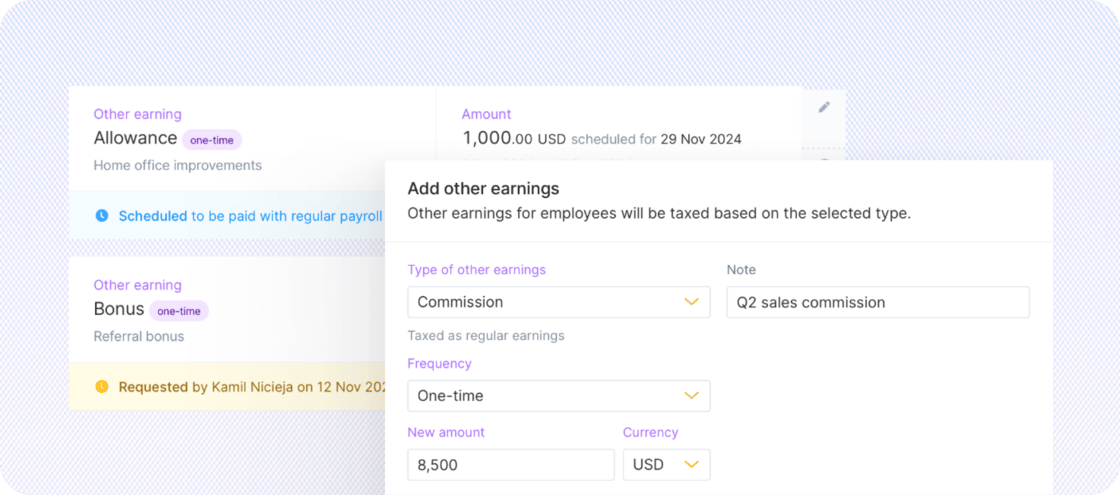 ### International employees
All compensation changes for international employees, including changes to other earnings, will be reviewed and processed by our Operations team after you submit the change request in the platform. No more emails — enjoy real-time visibility into the status of your requests.
Note: This feature will be rolled out in phases over the coming weeks. See the [step-by-step guide](https://help.plane.com/en/articles/10177223) to learn more.
## Other improvements and fixes
* We renamed "Compensation" to "Regular earnings" to better differentiate it from other earnings like bonuses, commissions, and allowances. "Compensation" is still used to describe a person’s total pay
* We fixed an issue blocking payroll for some US employees related to address changes.
[← Newer updates](/changelog/page/4) · [Older updates →](/changelog/page/6)
### International employees
All compensation changes for international employees, including changes to other earnings, will be reviewed and processed by our Operations team after you submit the change request in the platform. No more emails — enjoy real-time visibility into the status of your requests.
Note: This feature will be rolled out in phases over the coming weeks. See the [step-by-step guide](https://help.plane.com/en/articles/10177223) to learn more.
## Other improvements and fixes
* We renamed "Compensation" to "Regular earnings" to better differentiate it from other earnings like bonuses, commissions, and allowances. "Compensation" is still used to describe a person’s total pay
* We fixed an issue blocking payroll for some US employees related to address changes.
[← Newer updates](/changelog/page/4) · [Older updates →](/changelog/page/6)