> ## Documentation Index
> Fetch the complete documentation index at: https://docs.plane.com/llms.txt
> Use this file to discover all available pages before exploring further.
# Changelog
> New features, improvements, and fixes in Plane
## [Sign in faster and more securely with passkeys](/changelog/2026-06-15-sign-in-faster-and-more-securely-with-passkeys)
You can now conveniently sign in to Plane with a passkey instead of typing a password. Your device or password manager keeps the passkey safe and unlocks it at sign-in, so there is nothing to remember or type.
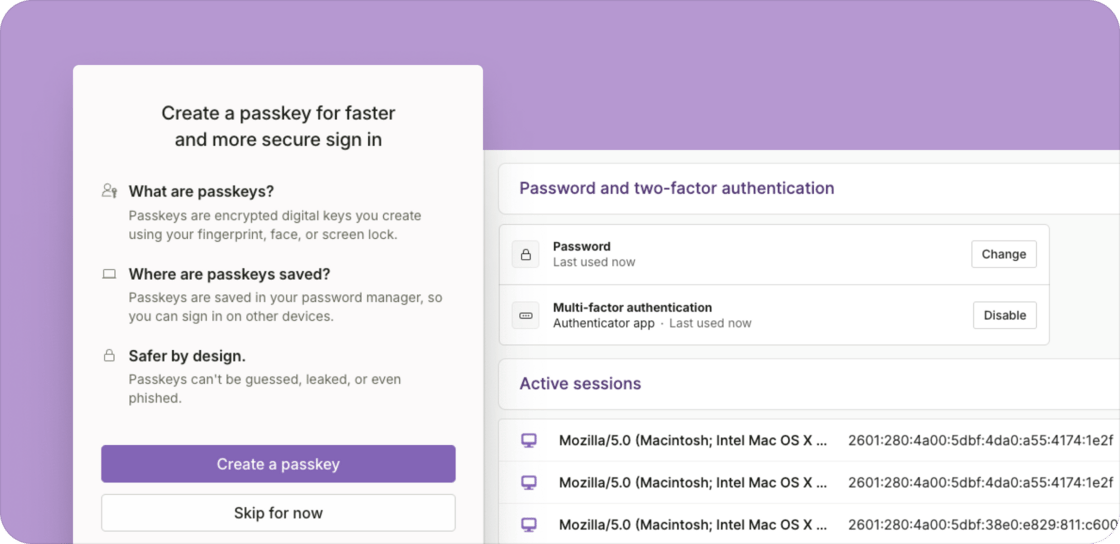 When you register for Plane, you'll have the option to create a passkey. If you already have an account, you'll get periodic reminders to create one, and you can choose not to be asked again if you would rather keep using a password.
## Other improvements and fixes
* **Review and sign out active sessions:** From your user settings page, you can now see every device signed in to your account and sign any of them out, so a shared or lost device can be ended remotely.
* **Bank account changes are now verified by email**: Because passkeys let team members use Plane without a password, changing a personal bank account no longer prompts the user for a password. Verification now requires providing a one-time code sent by email.
## [More flexibility in how you pay contractors and view balances](/changelog/2026-05-15-more-flexibility-in-how-you-pay-contractors-and-view-balances)
When paying contractors, you can now change your funding source before scheduling the payments.
### Choose your funding source
When you register for Plane, you'll have the option to create a passkey. If you already have an account, you'll get periodic reminders to create one, and you can choose not to be asked again if you would rather keep using a password.
## Other improvements and fixes
* **Review and sign out active sessions:** From your user settings page, you can now see every device signed in to your account and sign any of them out, so a shared or lost device can be ended remotely.
* **Bank account changes are now verified by email**: Because passkeys let team members use Plane without a password, changing a personal bank account no longer prompts the user for a password. Verification now requires providing a one-time code sent by email.
## [More flexibility in how you pay contractors and view balances](/changelog/2026-05-15-more-flexibility-in-how-you-pay-contractors-and-view-balances)
When paying contractors, you can now change your funding source before scheduling the payments.
### Choose your funding source
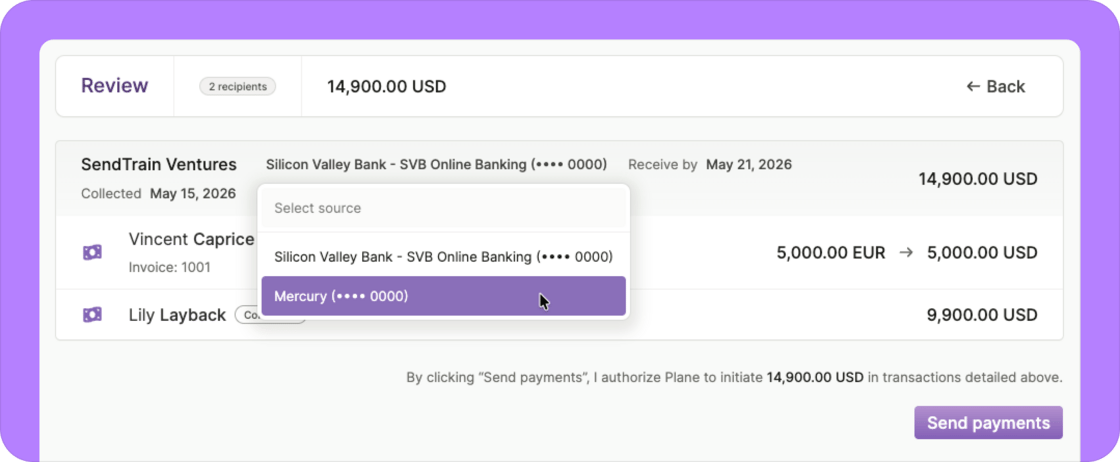 If you have a balance, Plane defaults the funding source to that balance whenever it can cover the run, but you can change it to any connected bank account from the review page.
The receive-by and payment dates also moved to the review step, where they're linked with the chosen funding source.
👉 *This feature is rolling out gradually over the next one to two weeks.*
### Contractors across multiple entities
When you're paying contractors who belong to different entities, Plane automatically groups them on the review page so each entity uses its own funding source.
### A refreshed Balances page
We rebuilt the *Balances* page with a cleaner look that matches the rest of Plane. You can now download statements as PDFs, and workspaces with multiple entities see one balance per entity.
### Other improvements and fixes
* **Accounting automation captures all invoices, not just subscriptions:** Previously, only subscription invoices flowed into the accounting. Other invoices, like EOR deposits, now appear as accounting items so finance teams can see and reconcile them. These items require manual account mappings for now — pre-built mappings for the new invoice types will come in a follow-up release.
* **Archive team members with a cancelled onboarding:** Workers whose onboarding was cancelled used to remain in a pending state, and can now be archived.
* **Employee title changes save reliably:** Edits to an employee's title were sometimes silently dropped on Save, and now take effect.
## [New time entries reports: one for admins, one for team members](/changelog/2026-04-30-new-time-entries-reports-one-for-admins-one-for-team-members)
You can now easily review and export your time entries in a structured format. We've added two Time entries reports: a workspace-wide view for admins, and a personal view for team members.
If you have a balance, Plane defaults the funding source to that balance whenever it can cover the run, but you can change it to any connected bank account from the review page.
The receive-by and payment dates also moved to the review step, where they're linked with the chosen funding source.
👉 *This feature is rolling out gradually over the next one to two weeks.*
### Contractors across multiple entities
When you're paying contractors who belong to different entities, Plane automatically groups them on the review page so each entity uses its own funding source.
### A refreshed Balances page
We rebuilt the *Balances* page with a cleaner look that matches the rest of Plane. You can now download statements as PDFs, and workspaces with multiple entities see one balance per entity.
### Other improvements and fixes
* **Accounting automation captures all invoices, not just subscriptions:** Previously, only subscription invoices flowed into the accounting. Other invoices, like EOR deposits, now appear as accounting items so finance teams can see and reconcile them. These items require manual account mappings for now — pre-built mappings for the new invoice types will come in a follow-up release.
* **Archive team members with a cancelled onboarding:** Workers whose onboarding was cancelled used to remain in a pending state, and can now be archived.
* **Employee title changes save reliably:** Edits to an employee's title were sometimes silently dropped on Save, and now take effect.
## [New time entries reports: one for admins, one for team members](/changelog/2026-04-30-new-time-entries-reports-one-for-admins-one-for-team-members)
You can now easily review and export your time entries in a structured format. We've added two Time entries reports: a workspace-wide view for admins, and a personal view for team members.
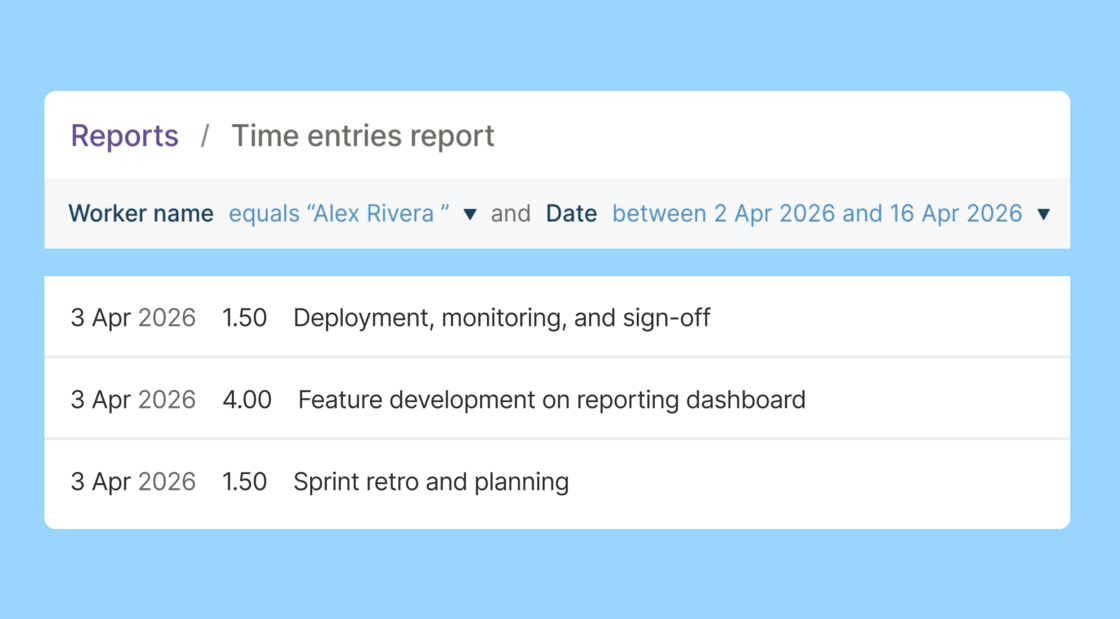 Both reports only appear when time tracking is enabled for the workspace.
## Other improvements and fixes
* **Optional W-8/W-9 collection for contractors:** W-8/W-9 collection is now optional in the new contractor onboarding flow, for customers who prefer to collect these forms outside of Plane.
* **COBRA and termination reminders for U.S. employees:** Terminating a U.S. employee now shows a reminder that Plane doesn't notify the employee on your behalf. When the employee has active health benefits, a second callout flags the employer's COBRA continuation-coverage obligation.
* **New expense reimbursement categories:** *Healthcare*, *Wellness*, *Coworking*, *Software*, and *Hardware* are available as reimbursement categories.
* **Easier accounting reconciliation for Plane subscriptions:** Subscription journal entries for monthly plans continue to post to the end of the period; annual subscriptions now post to the invoice date. Both memos reference the invoice number.
* **Benefit changes sync to payroll preview again:** We fixed a bug that delayed the sync of benefit changes to the payroll preview. Syncing is back to near real-time.
## [New onboarding experience: Move faster and always know where things stand](/changelog/2026-03-24-new-onboarding-experience-move-faster-and-always-know-where-things-stand)
We've completely redesigned the onboarding experience for contractors, international employees, U.S. employees, and vendor contacts.
Both reports only appear when time tracking is enabled for the workspace.
## Other improvements and fixes
* **Optional W-8/W-9 collection for contractors:** W-8/W-9 collection is now optional in the new contractor onboarding flow, for customers who prefer to collect these forms outside of Plane.
* **COBRA and termination reminders for U.S. employees:** Terminating a U.S. employee now shows a reminder that Plane doesn't notify the employee on your behalf. When the employee has active health benefits, a second callout flags the employer's COBRA continuation-coverage obligation.
* **New expense reimbursement categories:** *Healthcare*, *Wellness*, *Coworking*, *Software*, and *Hardware* are available as reimbursement categories.
* **Easier accounting reconciliation for Plane subscriptions:** Subscription journal entries for monthly plans continue to post to the end of the period; annual subscriptions now post to the invoice date. Both memos reference the invoice number.
* **Benefit changes sync to payroll preview again:** We fixed a bug that delayed the sync of benefit changes to the payroll preview. Syncing is back to near real-time.
## [New onboarding experience: Move faster and always know where things stand](/changelog/2026-03-24-new-onboarding-experience-move-faster-and-always-know-where-things-stand)
We've completely redesigned the onboarding experience for contractors, international employees, U.S. employees, and vendor contacts.
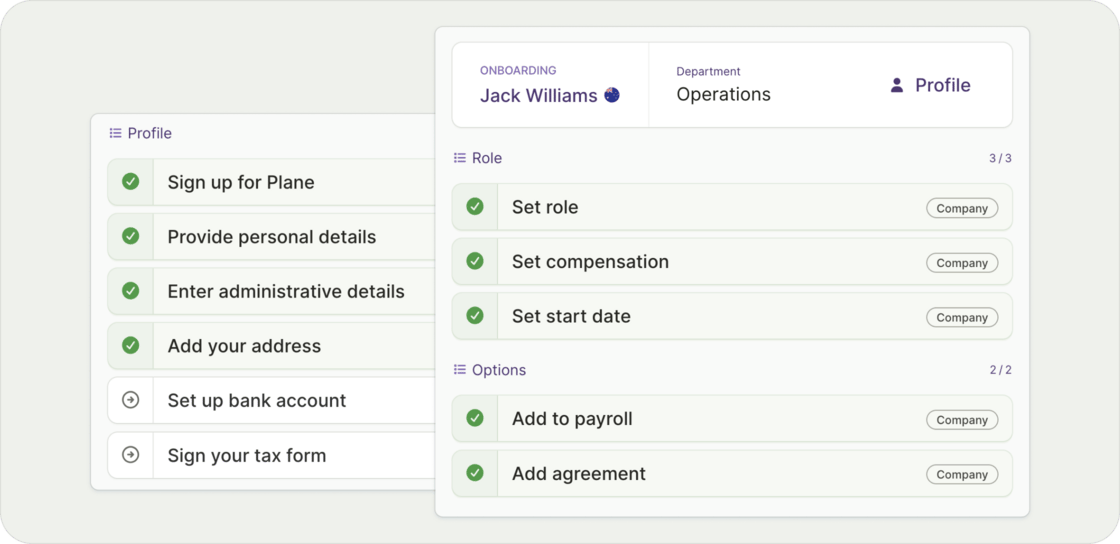 For a full breakdown, see [What's new in onboarding →](https://help.plane.com/en/articles/14063867-what-s-new-in-onboarding)
*Note: This feature is rolling out gradually. You'll see an in-app banner once your company has access. If you have a customer success contact, they may also be reaching out to you directly.*
***
### Other improvements and fixes
* **Vendor department mappings:** Vendor profiles now include a Department field. If you use accounting automation, you can apply department-based mapping rules so vendor expenses route to the correct GL account.
* **More flexible chart of account mappings:** When configuring account mappings with department-specific rules, the top-level account can now be set to "No account." For example, if a worker is missing a department or a rule hasn't been configured for them, their accounting item will remain unmapped and surface as an exception instead of being silently misclassified to the top-level account.
* **Benefit type locked after saving:** Once you define and save a benefit, the benefit type can no longer be updated. This change avoids potential downstream issues.
* **Benefit end dates:** We fixed issues related to setting end dates on benefits so they now work as expected.
## [Stay aware of important events in Google Calendar](/changelog/2026-03-12-stay-aware-of-important-events-in-google-calendar)
Admins can now subscribe to the Plane calendar so events in their workspace appear automatically in Google Calendar and other calendar apps.
For a full breakdown, see [What's new in onboarding →](https://help.plane.com/en/articles/14063867-what-s-new-in-onboarding)
*Note: This feature is rolling out gradually. You'll see an in-app banner once your company has access. If you have a customer success contact, they may also be reaching out to you directly.*
***
### Other improvements and fixes
* **Vendor department mappings:** Vendor profiles now include a Department field. If you use accounting automation, you can apply department-based mapping rules so vendor expenses route to the correct GL account.
* **More flexible chart of account mappings:** When configuring account mappings with department-specific rules, the top-level account can now be set to "No account." For example, if a worker is missing a department or a rule hasn't been configured for them, their accounting item will remain unmapped and surface as an exception instead of being silently misclassified to the top-level account.
* **Benefit type locked after saving:** Once you define and save a benefit, the benefit type can no longer be updated. This change avoids potential downstream issues.
* **Benefit end dates:** We fixed issues related to setting end dates on benefits so they now work as expected.
## [Stay aware of important events in Google Calendar](/changelog/2026-03-12-stay-aware-of-important-events-in-google-calendar)
Admins can now subscribe to the Plane calendar so events in their workspace appear automatically in Google Calendar and other calendar apps.
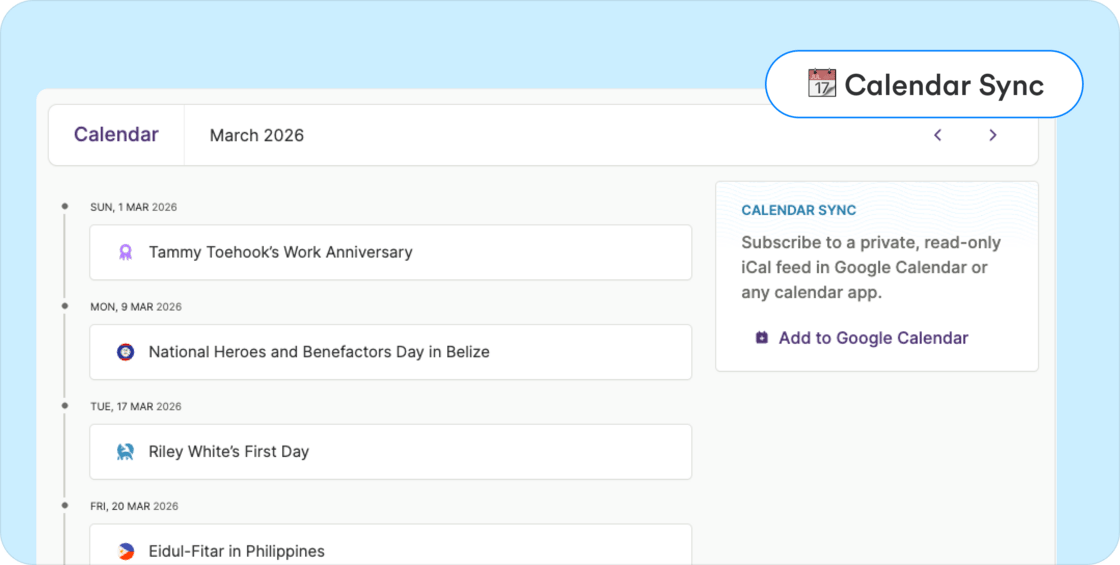 * Events stay in sync automatically when they are added or updated in Plane.
* The calendar feed can also be used with Apple Calendar, Outlook, or any calendar that supports the iCal format.
### To use this feature
* Go to Calendar > Calendar and click **Add to Google Calendar** to subscribe
* Or copy your private calendar link and add it as a subscription in your preferred calendar app.
Note: This feature is currently available to **admins only**. Manager-level feeds are not supported yet because calendar feeds do not restrict visibility to only a manager’s direct reports.
### Other improvements and fixes
* **PTO payout earning type:** You can now add PTO payout as a separate earning type instead of using allowances. PTO payouts are taxed as regular earnings and appear in payroll like other earnings. If you're using Plane’s accounting automation with QuickBooks, PTO payouts can be mapped to a separate GL account.
* **Benefit end dates align with pay periods:** Fixed an issue that could prevent adding end dates to certain benefits and cause dates to appear outside pay period boundaries. Benefits now align correctly with payroll periods and sync reliably.
* **Payroll item amounts stay aligned:** Fixed an issue where long tax, deduction, or benefit names could wrap to multiple lines and cause the amount column to appear misaligned in the payroll item view.
## [New look for onboarding team members](/changelog/2026-02-21-new-look-for-onboarding-team-members)
We've refreshed the onboarding experience with a cleaner, more user-friendly layout that gives you better visibility into the onboarding process.
* Events stay in sync automatically when they are added or updated in Plane.
* The calendar feed can also be used with Apple Calendar, Outlook, or any calendar that supports the iCal format.
### To use this feature
* Go to Calendar > Calendar and click **Add to Google Calendar** to subscribe
* Or copy your private calendar link and add it as a subscription in your preferred calendar app.
Note: This feature is currently available to **admins only**. Manager-level feeds are not supported yet because calendar feeds do not restrict visibility to only a manager’s direct reports.
### Other improvements and fixes
* **PTO payout earning type:** You can now add PTO payout as a separate earning type instead of using allowances. PTO payouts are taxed as regular earnings and appear in payroll like other earnings. If you're using Plane’s accounting automation with QuickBooks, PTO payouts can be mapped to a separate GL account.
* **Benefit end dates align with pay periods:** Fixed an issue that could prevent adding end dates to certain benefits and cause dates to appear outside pay period boundaries. Benefits now align correctly with payroll periods and sync reliably.
* **Payroll item amounts stay aligned:** Fixed an issue where long tax, deduction, or benefit names could wrap to multiple lines and cause the amount column to appear misaligned in the payroll item view.
## [New look for onboarding team members](/changelog/2026-02-21-new-look-for-onboarding-team-members)
We've refreshed the onboarding experience with a cleaner, more user-friendly layout that gives you better visibility into the onboarding process.
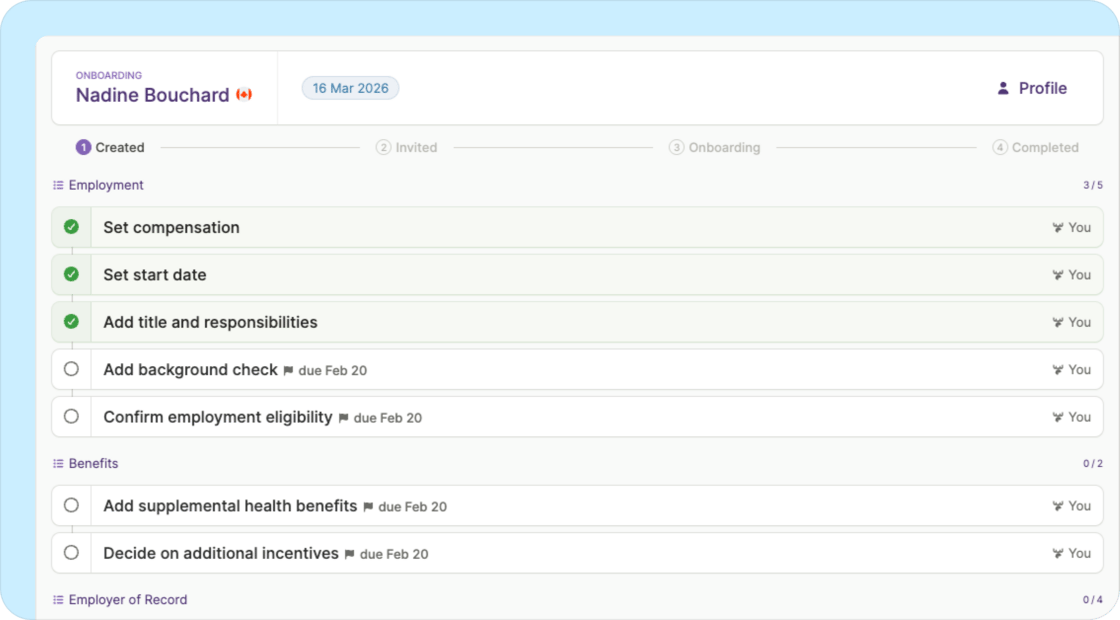 * **Better organization:** Tasks are now grouped into checklists by category (Employment, Profile, Compliance, etc.), so it’s easier to see what needs to be done.
* **Enhanced visibility:** See all worker tasks upfront with granular status tracking. Previously, worker onboarding status was summarized as high-level milestones — now you know exactly where they're at in the process.
* **Consistency:** The interface now matches how tasks are represented throughout your Plane dashboard.
This refresh is the first step in a much larger onboarding overhaul coming in the next few weeks. Stay tuned!
## Other improvements and fixes
* **"Save and continue" works correctly when adding a team member:** The button is now disabled until required information is complete, preventing confusion across worker types.
* **Benefits and deductions report sorts correctly:** The general export now sorts by Pay date (newest first), then Last name, First name, and Contribution type.
* **Missing date of birth payroll issue displays correctly:** The Payroll issues page now shows “Employee is missing date of birth” instead of a generic error.
## [Track contributions across every payroll](/changelog/2026-02-13-track-contributions-across-every-payroll)
Admins can now run a Payroll Benefits and Deductions report to see all benefits and deductions applied to a payroll run, making it easier to review and reconcile payroll data.
* The report includes contribution amounts broken out by pre-tax, post-tax, employee, and employer.
* Filter by payroll date or contribution type, and export to CSV or Excel for reconciliation.
* **Better organization:** Tasks are now grouped into checklists by category (Employment, Profile, Compliance, etc.), so it’s easier to see what needs to be done.
* **Enhanced visibility:** See all worker tasks upfront with granular status tracking. Previously, worker onboarding status was summarized as high-level milestones — now you know exactly where they're at in the process.
* **Consistency:** The interface now matches how tasks are represented throughout your Plane dashboard.
This refresh is the first step in a much larger onboarding overhaul coming in the next few weeks. Stay tuned!
## Other improvements and fixes
* **"Save and continue" works correctly when adding a team member:** The button is now disabled until required information is complete, preventing confusion across worker types.
* **Benefits and deductions report sorts correctly:** The general export now sorts by Pay date (newest first), then Last name, First name, and Contribution type.
* **Missing date of birth payroll issue displays correctly:** The Payroll issues page now shows “Employee is missing date of birth” instead of a generic error.
## [Track contributions across every payroll](/changelog/2026-02-13-track-contributions-across-every-payroll)
Admins can now run a Payroll Benefits and Deductions report to see all benefits and deductions applied to a payroll run, making it easier to review and reconcile payroll data.
* The report includes contribution amounts broken out by pre-tax, post-tax, employee, and employer.
* Filter by payroll date or contribution type, and export to CSV or Excel for reconciliation.
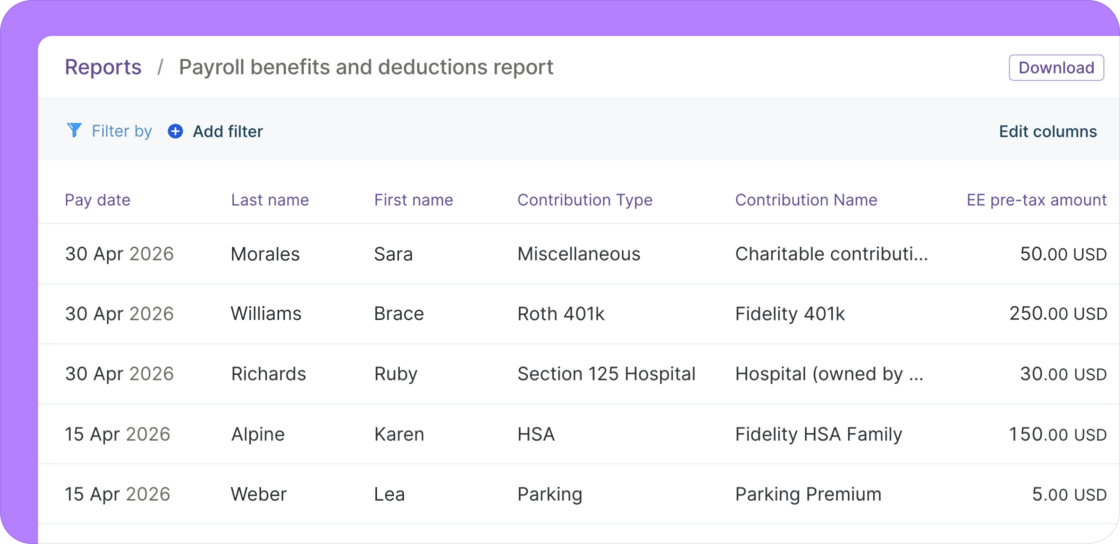 This report also includes a Voya 401(k) export option, formatted for direct upload to Voya without manual reformatting. We plan to add other provider-specific formats — let our [Support team](mailto:support@plane.com) know if you have a request.
### Other improvements and fixes
* **Simplified earnings view for international employees:** Employees now see a clearer view of their historical payroll, showing only gross earnings with a direct link to their pay stub for full details.
* **Payrolls stuck in processing now move to Overdue:** Payrolls that don't complete processing now transition to Overdue when the approval deadline has passed, giving you clearer visibility when something needs attention.
* **Refreshed visual styling:** We updated the color palette and reduced shadows across the app for a cleaner and brighter experience.
## [New reports for benefits, compensation, and payments](/changelog/2026-01-28-new-reports-for-benefits-compensation-and-payments)
We added several new reports to make it easier to access and review data across benefits, compensation, and payments, supporting different workflows and reporting needs.
This report also includes a Voya 401(k) export option, formatted for direct upload to Voya without manual reformatting. We plan to add other provider-specific formats — let our [Support team](mailto:support@plane.com) know if you have a request.
### Other improvements and fixes
* **Simplified earnings view for international employees:** Employees now see a clearer view of their historical payroll, showing only gross earnings with a direct link to their pay stub for full details.
* **Payrolls stuck in processing now move to Overdue:** Payrolls that don't complete processing now transition to Overdue when the approval deadline has passed, giving you clearer visibility when something needs attention.
* **Refreshed visual styling:** We updated the color palette and reduced shadows across the app for a cleaner and brighter experience.
## [New reports for benefits, compensation, and payments](/changelog/2026-01-28-new-reports-for-benefits-compensation-and-payments)
We added several new reports to make it easier to access and review data across benefits, compensation, and payments, supporting different workflows and reporting needs.
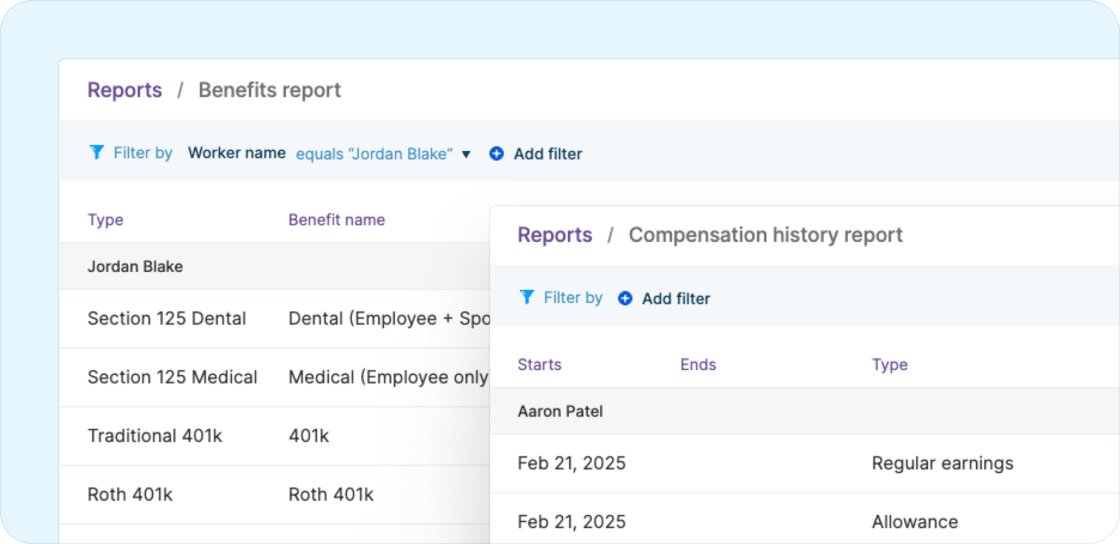 * **Benefits report:** View how benefits are configured for employees, including contribution amounts, frequencies, and coverage periods, for U.S. employees.
* **Compensation history report:** See compensation changes over time for each employee across all earning types, including regular earnings, bonuses, commissions, and allowances, with clear effective dates and amounts.
* **Contractor payments report:** Contractors can view and export their own payment history in a dedicated report, making it easier to track payments and keep records up to date.
### Other improvements and fixes
* **HSA contribution limits can now be set:** Added support for configuring the HSA contribution limit (individual or family) when setting up HSA benefits, ensuring contribution limits are handled correctly in payroll.
* **Payroll summary totals now reflect actual payroll liability:** Fixed an issue where the payroll summary overstated total payroll liability by including employee taxes and withholdings, even though payroll itself was processed accurately.
* **Payroll now runs for reimbursement-only payrolls:** Fixed an issue where payroll was not generated when a payroll run only included expense report reimbursements and no regular earnings, which could prevent reimbursements from being processed.
* **1099 “Do not file” now works as expected:** Fixed an issue where selecting “Do not file” for a contractor did not move them out of the filing list, reducing the risk of an unintended 1099 filing.
[← Newer updates](/changelog) · [Older updates →](/changelog/page/3)
* **Benefits report:** View how benefits are configured for employees, including contribution amounts, frequencies, and coverage periods, for U.S. employees.
* **Compensation history report:** See compensation changes over time for each employee across all earning types, including regular earnings, bonuses, commissions, and allowances, with clear effective dates and amounts.
* **Contractor payments report:** Contractors can view and export their own payment history in a dedicated report, making it easier to track payments and keep records up to date.
### Other improvements and fixes
* **HSA contribution limits can now be set:** Added support for configuring the HSA contribution limit (individual or family) when setting up HSA benefits, ensuring contribution limits are handled correctly in payroll.
* **Payroll summary totals now reflect actual payroll liability:** Fixed an issue where the payroll summary overstated total payroll liability by including employee taxes and withholdings, even though payroll itself was processed accurately.
* **Payroll now runs for reimbursement-only payrolls:** Fixed an issue where payroll was not generated when a payroll run only included expense report reimbursements and no regular earnings, which could prevent reimbursements from being processed.
* **1099 “Do not file” now works as expected:** Fixed an issue where selecting “Do not file” for a contractor did not move them out of the filing list, reducing the risk of an unintended 1099 filing.
[← Newer updates](/changelog) · [Older updates →](/changelog/page/3)